When something did not happen
Almost every question about a schedule is answered by the rule's own History, which records every occurrence — including the ones that deliberately created nothing.
Read the run history first
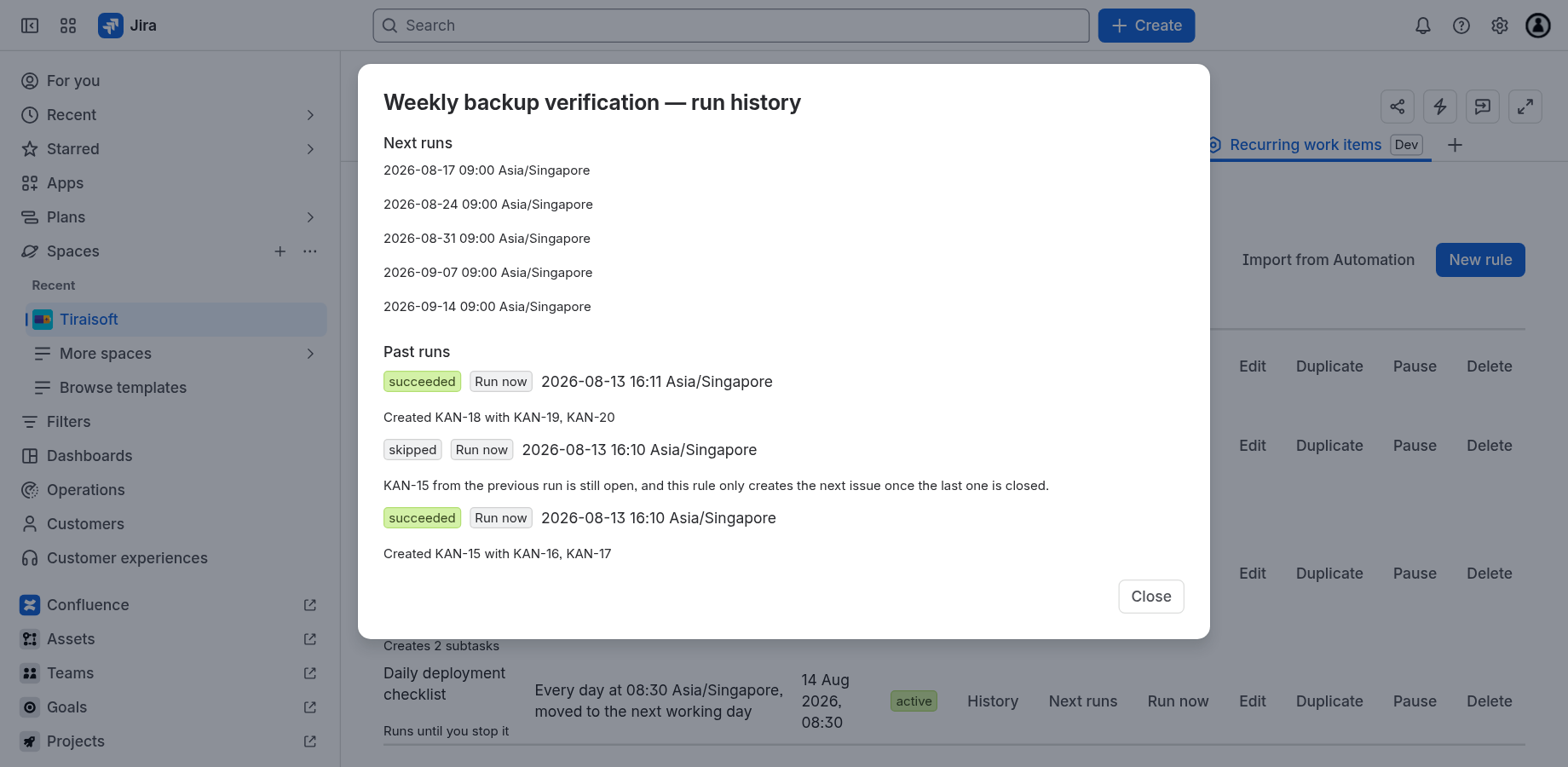
Open History on any rule. Each past run carries:
- A status —
succeeded,failed,skipped, orclaimed(running right now). - A trigger, when it was not the ordinary schedule —
Run nowfor a manual run,recoveredfor one that stalled and was picked up again by the hourly sweeper. - The scheduled time, in the rule's own time zone, which is what you set.
- The outcome — Created KAN-18 with KAN-19, KAN-20. Subtasks are named rather than counted, so a run that should have made three and made two says so.
- Any adjustment or warning, in the words below.
History pages 20 runs at a time, with Load older runs beneath.
What each explanation means
A run that did not happen exactly where the pattern put it says why:
When a run fails
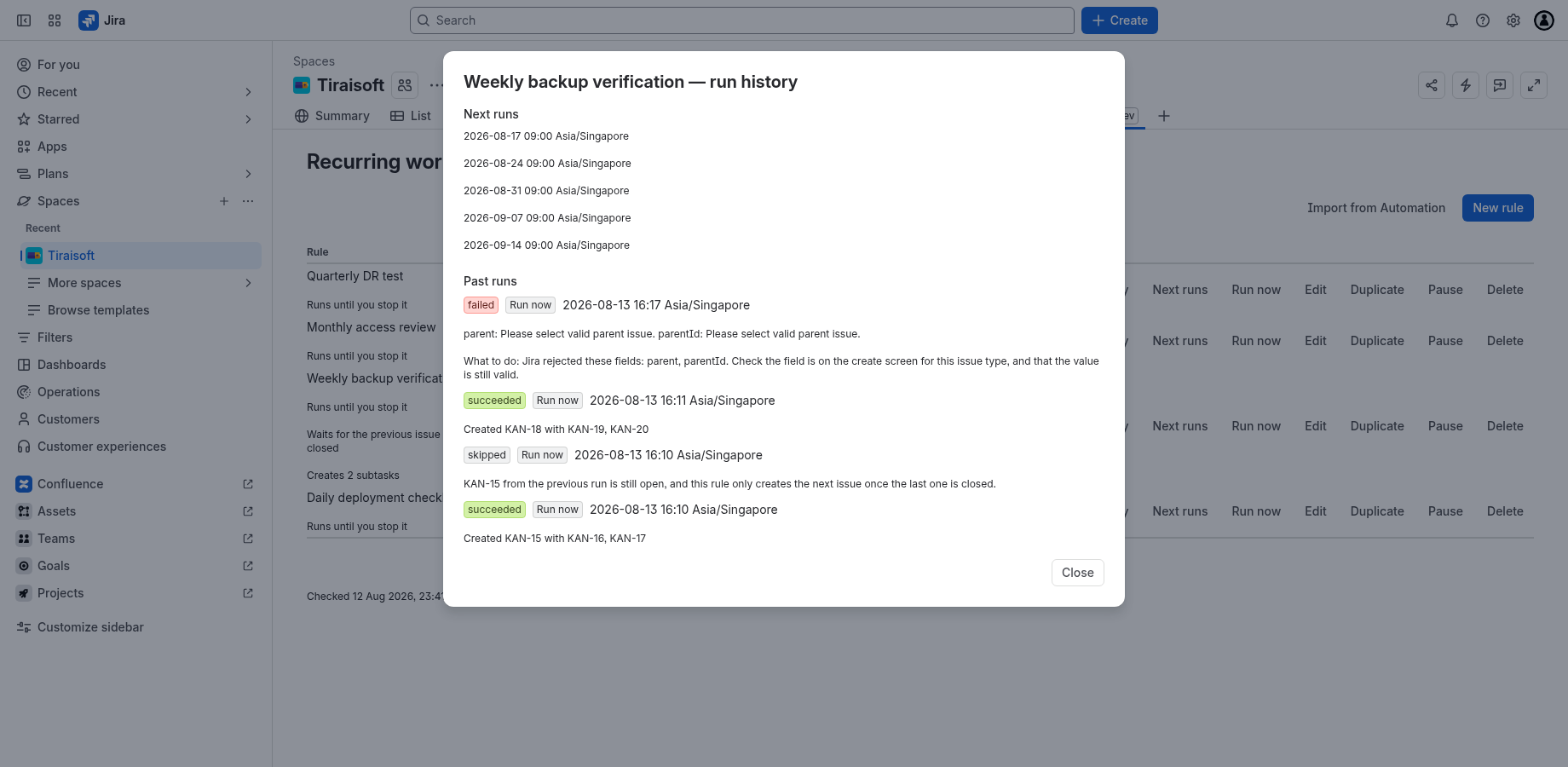
Failures come in three kinds, and they are handled differently on purpose:
- Transient — a rate limit or a Jira outage. Retried automatically with backoff for up to 24 hours. Usually nothing to do.
- Configuration — the rule or the project is wrong. Retrying cannot help, so it is not retried; the What to do: line says what to change.
- Permanent — anything else. Recorded and visible rather than retried forever.
Jira's own message is always kept rather than paraphrased, because "Field customfield_10011 cannot be set. It is not on the appropriate screen" tells you exactly what to fix. The code beside it is stable and safe to quote in a support email:
| Code | Kind | What to check |
|---|---|---|
RATE_LIMITED | transient | Jira asked us to slow down. Retried automatically; nothing to do unless it repeats for hours. |
UPSTREAM_ERROR | transient | Jira returned a server error. Retried automatically. |
FIELD_REJECTED | configuration | Jira named the fields it refused. Check each is on the create screen for this issue type, and that its value is still valid. |
ISSUE_TYPE_NOT_FOUND | configuration | The issue type the rule creates has been deleted, or is no longer available in that project. The rule is blocked rather than retried: open it, pick an issue type the project still offers, and resume it. |
INVALID_REQUEST | configuration | Jira refused the request without naming a field. Open the rule and check its project, issue type and fields. |
APP_PERMISSION | configuration | The app may not create issues in this project. Grant the permission, then run the rule again. |
PROJECT_NOT_FOUND | configuration | The project or issue type no longer exists. If it is the issue type, open the rule and pick one the project still offers; if the project is gone, recreate the rule in a project that exists — a rule cannot be moved between projects. |
PROJECT_ARCHIVED | configuration | The project the rule creates in has been archived, so nothing can be created in it. The rule is blocked rather than retried: restore the project and resume the rule, or recreate the rule in a project that is still active — a rule cannot be moved between projects. |
UNEXPECTED_STATUS | permanent | Something we do not have a specific answer for. Quote this row to support. |
REQUEST_FAILED | permanent | We could not reach Jira at all — the call failed before it got an answer. The occurrence is not retried and not re-created; use Run now to fill the gap, and quote this row to support if it repeats. |
MALFORMED_RESPONSE | permanent | Jira accepted the create and returned no issue key, so we cannot say which issue it made. Check the project for an issue matching the rule before using Run now, or you will get two. |
STRANDED | permanent | The occurrence was claimed but never executed, and re-driving it did not help — usually a run interrupted mid-flight. It will not come back: the schedule has already moved on, so use Run now if you still want that issue. |
Whichever kind it was, a failed run neither moves the schedule nor comes back later. The next run is fixed when the occurrence is claimed, before Jira is called, so a failure never delays or repeats it — once the cause is fixed the rule runs again at its usual time, and no backlog of retried tickets arrives with it. Nor is the failed occurrence re-created: a failed run is not a missed run, which is an occurrence that never ran at all. To fill the gap one left, use Run now, once per issue you want.
"Some rules are failing"
A health check runs once a day across every active rule in the project and writes one line under the rules table. It says three things the table cannot: how many of how many (the table shows one page; the audit counted them all), which ones by name, and since when — because three failures deep looks the same on day one and on day fourteen, and they are not the same problem.
Because it runs daily, the line can be up to a day old. A rule you have just fixed still
carries its failing lozenge until the next check; its History is the live
answer.
If the line is absent entirely, the audit has never run for this project — a project enrolled this morning has no audit yet. That is deliberately different from "checked, nothing wrong".
The check also notifies somebody
The line under the table only reaches a person who opens the page, so the check also sends a Jira notification on the two edges: the first day a rule is reported failing, and the first day it is not. Nothing is sent on the days in between — a rule that was failing yesterday and is failing today has already been reported.
The notice hangs on the last issue that rule created, which is the thing that stopped arriving, and goes to the rule's owner — the person who created it — when the rule records one. When it does not, it goes to that issue's assignee and reporter instead. A rule that has never created an issue has nowhere to hang a notice, so none is sent. Jira then delivers it the way it delivers its own notifications, which for most people means email.
To stop receiving them, any of: fix the failure (the recovery notice is the last one you get), Pause or delete the rule — the check walks active rules only, so a paused rule sends nothing — or turn the notification off in your own Jira Personal settings → Notifications, which governs how Jira delivers every notification it sends you.
A rule did not create an issue
In roughly the order worth checking:
- It is not due yet. Runs happen within about 5 minutes of the time you chose. Check Next runs.
- The project was turned off. With the app off for a project, no rule in it runs and nothing appears in the project menu. Turn it back on — the rules are still there.
- The rule is paused, or has reached its end condition and shows
completed. - The previous issue is still open and the rule is set to wait for it. The history says which issue.
- It landed on a non-working day and the rule is set to skip. The history says so.
- A field left the create screen, or an assignee was deactivated. That is a
FIELD_REJECTEDorINVALID_REQUESTrow in the history. - The app is unlicensed. Scheduled runs stop while a licence is lapsed or a trial has ended. Missed runs are then handled by the rule's catch-up setting when it resumes.
Limits
| Limit | Value |
|---|---|
| Subtasks per rule | 10 |
| Repeat interval (every N) | 1 to 366 |
| Holidays per project | 400 |
| How far a run searches for a working day | 14 days |
| Largest argument to a date token | 10,000 |
| Rules shown per page | 50 |
| Runs shown per page of history | 20 |
| Occurrences in the Next runs preview | 5 |
| Timing accuracy | about 5 minutes |
| Run history retention | 180 days |
There is no limit on the number of rules in a project.
Data and retention
Rules and project settings persist until you delete them. Run history records expire automatically 180 days after they are written — long enough to answer "what happened last quarter", and no longer. Uninstalling the app removes its stored data with the installation.
Everything is stored in Atlassian's own app storage inside your site. See the privacy policy.
Still stuck
Open the rule's History, and send us that row and the rule's name. That is usually enough to answer without needing access to your site.